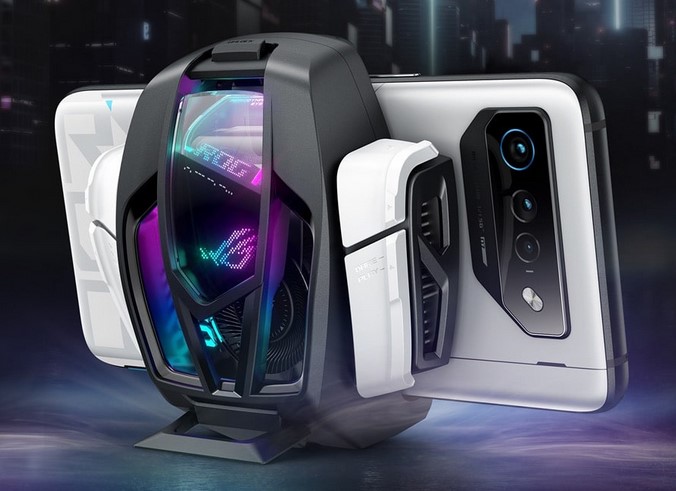
You are in the final circle of a high-stakes battle royale match. Your palms are sweaty, your heart is racing, and your thumb is hovering over the “Fire” button. Suddenly, your screen dims, your frame rate drops from a silky 90 FPS to a stuttering 15 FPS, and the back of your phone feels like a hot plate. You’ve just been eliminated—not by a better player, but by Thermal Throttling.
In my decade-plus journey through the tech industry, I’ve seen hardware pushed to its absolute limits. I remember consulting for a mobile health startup where we used high-resolution thermal imaging to track muscle inflammation. The irony? Our high-end smartphones were overheating so fast from the processing load that the data became skewed. That was my first “aha!” moment: mobility is useless if your hardware can’t handle the heat.
For today’s mobile gamers, smartphone cooling devices are no longer a “nerdy” accessory; they are a performance-critical necessity. If you want to play at a professional level, you need to understand the science of staying cool.
The Invisible Ceiling: Why Phones Get Hot
Modern smartphones are engineering marvels, packing more processing power than the computers used to send humans to the moon. However, they have one massive design flaw: No internal fans. Unlike a PC or a gaming console, your phone relies on “passive cooling,” meaning it dissipates heat through its frame and glass.
The Marathon Runner Analogy
Imagine a professional marathon runner (your phone’s CPU/GPU). Under normal conditions, they run perfectly. But if they have to run in a thick winter coat (a phone case) in 35°C weather, they eventually slow down to a crawl to avoid a heart attack. That “slowing down” is what we call Thermal Throttling. Smartphone cooling devices act like a personal air conditioner for that runner, allowing them to sprint indefinitely.
1. How Smartphone Cooling Devices Actually Work
When you start looking for smartphone cooling devices, you’ll realize they aren’t just fans. The technology has evolved into two distinct categories that every intermediate gamer should know.
Fan-Based Air Coolers
These are the most common and budget-friendly. They use a high-RPM fan to blow air directly onto the back of the phone. While helpful, they primarily cool the exterior casing. In my experience, these are great for casual sessions but struggle against the “Triple-A” mobile titles like Genshin Impact or Warzone Mobile.
Semiconductor (Peltier) Cooling
This is where things get technical and exciting. These devices use the Peltier Effect. When electricity passes through a semiconductor, one side becomes freezing cold while the other becomes hot. The cold side sits against your phone, literally sucking the heat out of the internal components. I’ve seen Peltier coolers drop a phone’s internal temperature by 15°C in under three minutes.
2. Why “Pro” Gamers Swear by External Cooling
If you are still on the fence about whether you need one, let’s look at the data-driven benefits of using smartphone cooling devices.
-
Maintaining Peak Frame Rates: Throttling usually kicks in when the SoC (System on a Chip) hits 40–45°C. A cooler keeps you below that threshold, ensuring your FPS stays locked.
-
Battery Health Longevity: Heat is the #1 killer of lithium-ion batteries. By keeping your phone cool, you are preventing the chemical degradation that leads to “battery bloat” and reduced capacity over time.
-
Stable Connection: High heat can actually affect your 5G/Wi-Fi modem. If your phone is burning up, your “ping” might spike, leading to lag that has nothing to do with your internet provider.
3. The Tech Stack: Features to Look For
Not all smartphone cooling devices are created equal. When I audit hardware, I look for three specific technical indicators:
-
Thermal Conductivity: Look for coolers with a high-quality Conductive Silicone Pad. This ensures there is no air gap between the cooler and your phone.
-
Noise Decibels (dB): You don’t want a fan that sounds like a jet engine when you’re trying to hear enemy footsteps. Aim for something under 30dB.
-
App Integration: High-end coolers from brands like Black Shark or Flydigi allow you to monitor real-time temperatures and adjust fan speeds via Bluetooth.
4. Addressing the “Bulk” Factor: A Personal Insight
One thing I learned during my years in the field is that ergonomics matter as much as electronics. Adding a cooling device changes how you grip your phone.
I’ve found that the best smartphone cooling devices use a magnetic (MagSafe-style) attachment rather than a clamp. Clamps can often press against your volume or power buttons, which is incredibly frustrating in the heat of battle. If your phone supports it, go magnetic. It keeps the weight centered and your buttons free.
5. Expert Advice: The “Hidden Warning”
While these devices are life-savers, there is a technical phenomenon you must be aware of: Condensation.
Tips Pro: If you use a powerful Peltier cooler in a humid environment (like Indonesia or Singapore), the surface of the cooler can get so cold that water droplets form—just like on a cold soda can.
Never leave your cooling device running if you aren’t actually playing a game. If the cooler is on but the phone isn’t generating heat, that condensation can seep into your phone’s internal components, potentially causing water damage. Always turn off the cooler as soon as you close the game.
6. Is it Worth the Investment?
For a beginner, a $20–$50 investment in smartphone cooling devices might seem steep. But let’s look at the math. A high-end gaming phone costs $800–$1,200. If you play for 3 hours a day at high temperatures, you are significantly shortening the lifespan of that expensive hardware.
Think of a cooling device not as an “extra,” but as a maintenance tool that protects your investment while giving you a competitive edge. It’s the difference between playing like a pro and being the player who “lags out” during the most important moment of the game.
Summary: Stay Cold, Stay Winning
In the world of mobile technology, heat is the enemy of performance. By understanding the difference between simple fans and semiconductor technology, and by managing the risks like condensation, you can transform your mobile gaming experience.
Don’t let your hardware hold your skills back. Take control of your thermals, and you’ll find that “lag” becomes a thing of the past.
What’s your “Meltdown” Story?
Have you ever had a phone shut down in the middle of a tournament, or are you skeptical that a little fan can really make a difference? I want to hear your experiences! Drop a comment below with your phone model and tell me—does it run too hot for its own good?
