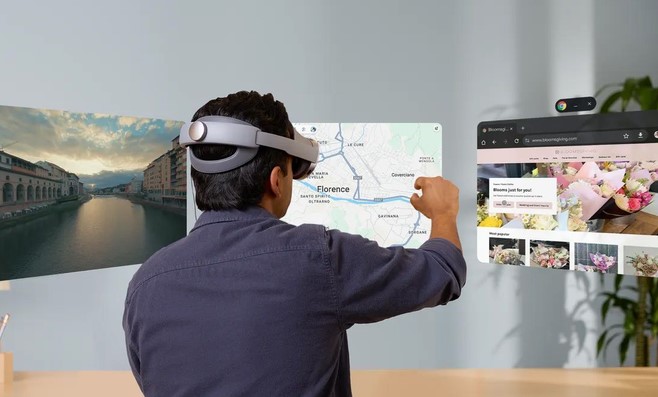
Imagine sitting at a tiny, cramped desk in a noisy coffee shop, struggling to manage complex spreadsheets and endless video calls on a single 13-inch laptop screen. Your neck aches, your focus is constantly shattered by ambient distractions, and buying three 27-inch 4K monitors isn’t remotely realistic when you live in a small apartment or work while traveling.
Now imagine putting on a lightweight headset and instantly stepping into an expansive, quiet penthouse office overlooking a glowing skyline. Floating in front of you are four massive, ultra-crisp monitors positioned exactly where you want them. You grab a physical coffee cup off your real desk, glance at your real physical keyboard through high-definition color passthrough, and dive into three hours of uninterrupted, deep focus work.
For over a decade, I have tested, reviewed, and audited hardware and software across the spatial computing landscape. In the early days of head-mounted displays, using virtual reality for actual work was an exercise in pure frustration—you had to contend with blurry low-resolution text, heavy headsets that strained your neck after twenty minutes, and clunky input controls.
Fast-forward to 2026, and spatial hardware paired with sophisticated VR productivity apps has matured into a powerful, daily-driver alternative to traditional physical workstations.
Here is a deep dive into how spatial computing transforms remote productivity, the essential software driving this movement, and how to set up your own virtual office without running into common pitfalls.
How Spatial Computing Elevates Daily Workflows
To understand why working inside a virtual headset is becoming so popular, think of traditional flat monitors like picture frames hanging on a wall. You are forced to fit all your open applications, browser tabs, and files inside those rigid physical boundaries. If you run out of glass, you have to constantly minimize, stack, or alt-tab between windows.
VR productivity apps break down those physical walls entirely. Instead of working on a computer screen, your surrounding physical room becomes the infinite canvas.
┌───────────────────────────────────────────────────────────┐
│               VR PRODUCTIVITY ARCHITECTURE                │
├──────────────────────────┬────────────────────────────────┤
│ Display Canvas           │ Unlimited Virtual 4K Monitors  │
│ Reality Integration      │ Mixed Reality (MR) Passthrough │
│ Connectivity             │ Low-Latency Wi-Fi 6E / USB-C   │
│ Control Input            │ Hand Tracking & Physical Board │
└──────────────────────────┴────────────────────────────────┘
By leveraging Mixed Reality (MR) Passthrough, modern headsets blend your actual environment with digital displays. You can anchor a private virtual monitor above your kitchen table while still seeing your room, your keyboard, and anyone who walks into the space.
Top VR Productivity Apps Reshaping Work in 2026
Whether you need a quiet solo workspace or a collaborative virtual boardroom, these leading applications define spatial productivity today:
1. Immersed: The Virtual Multi-Monitor Powerhouse
For multi-taskers, software developers, and financial analysts who thrive on raw screen real estate, Immersed remains an absolute industry leader.
-
Multi-Screen Mirroring: Wirelessly stream up to five high-resolution virtual monitors from your Mac, PC, or Linux machine simultaneously.
-
Portability: Eliminates the need to buy or haul heavy physical monitors when working remotely or traveling.
-
Shared Workrooms: Allows distributed remote teams to sit at the same virtual table, share screens seamlessly, and collaborate as lifelike avatars.
2. Virtual Desktop: Low-Latency Performance & Control
Originally built for low-latency media and gaming streaming, Virtual Desktop has evolved into a essential utility for remote professionals.
-
Ultra-Crisp Text Rendering: Utilizes advanced supersampling algorithms to make fine text in code editors and documents ultra-sharp and easy to read.
-
Custom Environments: Offers environments ranging from cozy high-rise apartments to classic auditoriums and dark home theaters.
-
Seamless Connectivity: Delivers stable, low-latency streaming paired with a dedicated Wi-Fi 6 router.
3. Spatial & ShapesXR: Interactive 3D Collaboration & Design
When work involves spatial layout, 3D assets, or interactive product design, traditional 2D video meetings fall flat.
-
Spatial: Drops distributed teams into immersive 3D meeting rooms where members can annotate, pin documents, share interactive whiteboards, and present models.
-
ShapesXR: Enables UX/UI designers and spatial engineers to rapidly prototype 3D user interfaces and spatial layouts directly inside VR without writing complex code.
Technical Comparison: Spatial Workstation vs. Traditional Setup
| Workstation Feature | Traditional Multi-Monitor Desk | Spatial VR Workstation |
| Physical Footprint | Requires large desk space & monitor arms | Zero extra desk space required |
| Max Screen Count | Limited by GPU ports & physical space | Up to 5+ virtual screens in custom layouts |
| Visual Privacy | Anyone walking behind you can view screens | 100% private; screens are visible only inside headset |
| Travel Portability | Extremely difficult (Heavy hardware) | Fits entirely inside a small travel case |
| Ergonomic Flexibility | Fixed sitting/standing desk orientation | Work lying down, sitting, or standing anywhere |
Expert Advice: Pro-Tips & Hidden Caveats
Before swapping your physical office setup for a spatial environment, keep these critical hardware and setup factors in mind:
💡 Pro Tip: Leverage Mixed Reality Passthrough & Bluetooth Passthrough
To prevent typing errors without mastering blind touch-typing, use applications that support Keyboard Cutouts or full Color Passthrough. By pair-bonding a physical Bluetooth keyboard and mouse directly to your host PC (rather than the headset), you maintain zero latency while keeping your physical peripheral layout visible right below your floating virtual screens.
⚠️ Hidden Caveat: The Ergonomic & “Vergence-Accommodation” Limit
While modern headsets are lighter than ever, wearing an 800-gram optical device for six continuous hours can cause neck fatigue and visual strain. Take mandatory 15-minute breaks every 90 minutes using the 20-20-20 visual rule. Furthermore, ensure your headset’s Interpupillary Distance (IPD) is measured precisely down to the millimeter to prevent eye fatigue.
Step Into the Future of Flexible Work
Spatial computing is no longer just a futuristic experiment or a novelty reserved for tech enthusiasts. By pairing modern head-mounted displays with dedicated VR productivity apps, you gain complete control over your working environment—maximizing focus, reclaiming physical desk space, and carrying a multi-monitor studio anywhere you go.
Join the Conversation
Have you ever tried working or managing tasks inside a virtual reality environment, or are you curious about taking your daily workflow spatial? Share your thoughts, experiences, or questions in the comments below! Let’s discuss how spatial tools are reshaping modern work.

Comments are closed.