Picture this: You are sitting in a cramped airport terminal gate, leaning back with a steaming espresso in one hand and your backpack resting on your luggage. You receive a urgent Slack notification—a critical server configuration needs an immediate update, or a client expects a last-minute slide revision.
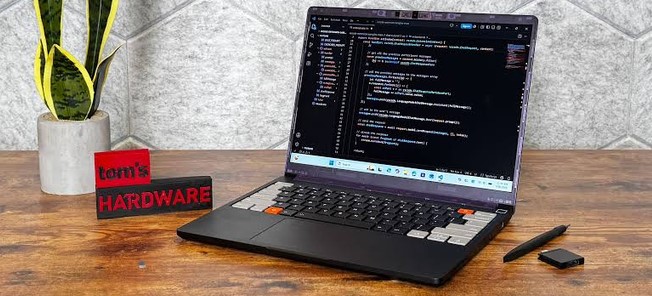
You pull out a device no larger than a hardcover notebook, flip open its sharp display, quickly patch the code using a physical QWERTY keyboard, and close it back up—all before your flight gate even begins boarding.
Not too long ago, “ultra-portable” computing meant making painful sacrifices. You had to endure sluggish netbook processors, squishy keyboards that cramped your fingers, and screens so dim they were virtually unreadable under office fluorescent lights.
Over my ten-plus years testing, tearing down, and writing about emerging hardware in the tech industry, I have watched the Ultra-Mobile PC (UMPC) segment transform from a quirky enthusiast gimmick into a legitimate productivity category. Thanks to breakthrough silicon architecture, modern mini laptops in 2026 pack workstation-grade performance into frames small enough to slide into a winter jacket pocket or a small crossbody bag.
Here is a deep dive into how these compact powerhouses work, why they are exploding in popularity, and how to choose the right one for your workflow.
What Makes 2026 Mini Laptops a Game Changer?
To understand why mini laptops have evolved, think of laptop processors like sports car engines. In the past, if you wanted a tiny chassis, you had to put in a tiny 2-cylinder engine; it saved space and battery, but it stalled the moment you stepped on the gas.
Today, semiconductor advances like 3nm architecture, system-on-chip (SoC) integration, and neural processing units (NPUs) act like superchargers. Chipmakers can now fit desktop-class multi-core performance into an engine the size of a postage stamp—without generating nuclear-level heat.
┌───────────────────────────────────────────────────────────┐
│                    THE MINI LAPTOP FORM FACTOR             │
├──────────────────────────┬────────────────────────────────┤
│ Display Size             │ 7.0" to 8.8" Touchscreens      │
│ Average Weight           │ 500g to 800g (1.1 - 1.7 lbs)   │
│ Core Processors          │ AMD Ryzen AI / Intel Core Ultra│
│ Unified Memory (RAM)     │ 16GB - 64GB LPDDR5X            │
│ Storage Options          │ Up to 4TB M.2 NVMe SSDs        │
└──────────────────────────┴────────────────────────────────┘
These micro-size machines feature high-density LPDDR5X memory, ultra-fast PCIe 4.0 SSDs, and vibrant OLED or LTPS displays running at high refresh rates. They are no longer limited to basic web browsing—they can edit 4K video footage, compile heavy software repositories, run local AI models, and play AAA games.
Core Advantages: Why Pocket-Sized PCs are Winning
1. Unmatched Portability and Ergonomics
The primary draw of a mini laptop is its form factor. Weighing between 500 to 800 grams, these devices eliminate shoulder strain during daily commutes or international travel. Whether you are on a crowded train or working from a narrow café counter, their small footprint fits anywhere.
2. High-Density Thermal Management
One of the most impressive hardware engineering feats I’ve inspected recently is mini laptop thermal cooling. Modern units use micro-vapor chambers, liquid metal thermal compounds, and high-static-pressure fans. This allows 28W+ processors to sustain boosted clock speeds without overheating the chassis.
3. Modular and Specialized Connectivity
Unlike mainstream ultrabooks that strip away ports in favor of extreme thinness, mini laptops cater heavily to power users, network engineers, and field technicians. Many models come equipped with modular port bays:
-
Native RS-232 Serial Ports for direct legacy server management.
-
KVM Control Modules to turn your mini laptop into an external terminal for headless servers.
-
Full-sized RJ45 Ethernet ports alongside dual Thunderbolt 4 / USB4 ports.
Matching Mini Laptops to Your Workflow
Not all compact laptops serve the same purpose. Here is how key specifications map out across popular use cases:
| Target User | Recommended Screen Size | Key Processor / GPU | Primary Feature Focus |
| System Admins & Engineers | 7.0″ – 8.0″ | Intel Core / AMD Ryzen 7 | Modular RS-232, KVM, drop resistance |
| Digital Nomads & Writers | 8.8″ – 10.1″ | AMD Ryzen AI / Apple Silicon | Optical trackpoint, high-refresh OLED screen |
| Mobile Gamers & Creators | 7.0″ – 8.9″ | AMD Radeon 890M / RDNA3.5 | Integrated game controllers, high-speed LPDDR5X |
Pro-Tips & Hidden Caveats from a Tech Veteran
Before you buy a mini laptop, keep these critical trade-offs in mind:
💡 Pro Tip: Get Used to Muscle Memory Training
Keyboards on 7 to 8-inch devices require an adjustment period. Because key spacing (pitch) is reduced by roughly 15-20% compared to a full-sized board, touch-typists will experience misclicks during their first week. Opt for models with an Optical TrackPoint positioned above or below the spacebar for precise cursor navigation without moving your hands away from the keys.
⚠️ Hidden Caveat: Thermal Throttling & Battery Realities
While manufacturer battery claims often cite 8 to 12 hours of light use, sustained workloads (such as 3D rendering or compiling code) will drain small 38Wh–50Wh batteries in about 2.5 to 4 hours. Always carry a 65W+ GaN power bank supporting Power Delivery (PD 3.0) to maintain high CPU power limits while traveling.
Is a Mini Laptop Right for You?
If your daily work involves sitting at a dedicated desk with dual monitors, a standard 15-inch or 16-inch laptop remains the standard choice.
However, if your lifestyle demands agile productivity—where you move between locations, work in tight spaces, or need a secondary computer that goes anywhere without a dedicated laptop bag—a 2026 mini laptop is an ideal companion. It bridges the gap between smartphone portability and desktop operating system capability.
Join the Conversation
Are you ready to swap your bulky backpack laptop for a pocket-sized workstation, or do you feel the key layout is too compact for your typing style? Drop your thoughts and questions in the comments below! Let’s discuss whether ultra-compact devices fit into your daily tech setup.
